3.2. Cost Estimation in Single-Table Query
PostgreSQL uses a cost-based query optimization model. Costs are dimensionless values; they do not serve as absolute performance indicators but are used to compare the relative performance of different operations.
Costs are estimated by the functions defined in costsize.c. Every operation performed by the executor has a corresponding cost function. For instance, the costs of sequential scans and index scans are calculated by cost_seqscan() and cost_index(), respectively.
PostgreSQL categorizes costs into three types: start-up, run, and total. Since the total cost is the sum of the start-up and run costs, only the first two are independently estimated.
- Start-up cost: The cost incurred before the first tuple is fetched. For an index scan, this includes the cost of reading index pages to access the first tuple in the target table.
- Run cost: The cost of fetching all tuples.
- Total cost: The overall cost, calculated as the sum of the start-up and run costs.
The EXPLAIN command displays both the start-up and total costs for each operation. A basic example is shown below:
|
|
On line 4, the output provides details for the sequential scan. The cost section contains two values: $0.00$ and $145.00$, representing the start-up cost and the total cost, respectively.
This section explores the estimation processes for sequential scans, index scans, and sort operations in detail.
The following examples utilize the table and index defined below:
testdb=# CREATE TABLE tbl (id int PRIMARY KEY, data int);
testdb=# CREATE INDEX tbl_data_idx ON tbl (data);
testdb=# INSERT INTO tbl SELECT generate_series(1,10000),generate_series(1,10000);
testdb=# ANALYZE;
testdb=# \d tbl
      Table "public.tbl"
 Column |  Type   | Modifiers
--------+---------+-----------
 id     | integer | not null
 data   | integer |
Indexes:
    "tbl_pkey" PRIMARY KEY, btree (id)
"tbl_data_idx" btree (data)3.2.1. Sequential Scan
The cost of a sequential scan is estimated by the cost_seqscan() function. This subsection explores the cost estimation for the following query:
testdb=# SELECT * FROM tbl WHERE id <= 8000;In a sequential scan, the start-up cost is $0$. The run cost is defined by the following equation:
$$ \begin{aligned} \text{'run cost'} &= \text{'cpu run cost'} + \text{'disk run cost'} \\ &= (\text{cpu_tuple_cost} + \text{cpu_operator_cost}) \times N_{\text{tuple}} + \text{seq_page_cost} \times N_{\text{page}} \end{aligned} $$Where:
- seq_page_cost, cpu_tuple_cost and cpu_operator_cost are set in the postgresql.conf file. Their default values are $1.0$, $0.01$, and $0.0025$, respectively.
- $N_{\text{tuple}}$ and $N_{\text{page}}$ are the numbers of all tuples and all pages of this table, respectively. These values can be retrieved using the following query:
testdb=# SELECT relpages, reltuples FROM pg_class WHERE relname = 'tbl';
 relpages | reltuples
----------+-----------
       45 |     10000
(1 row)
Based on the query result:
$$ \begin{align} N_{\text{tuple}} &= 10000 \tag{3-1} \\ N_{\text{page}} &= 45 \tag{3-2} \end{align} $$Therefore,
$$ \begin{align*} \text{'run cost'} &= (0.01 + 0.0025) \times 10000 + 1.0 \times 45 = 170.0 \\ \text{'total cost'} &= 0.0 + 170.0 = 170 \end{align*} $$The result of the EXPLAIN command confirms these estimations:
|
|
On line 4, the output shows the start-up and total costs as $0.00$ and $170.00$. The planner also estimates that $8000$ rows will be selected.
Line 5 displays the filter: “$(\text{id} <= 8000)$”, formally known as a table-level filter predicate.
Note that this type of filter is applied after reading all tuples from the table; it does not reduce the range of pages scanned on the disk.
As shown in the run-cost estimation, PostgreSQL assumes that all pages must be read from storage. The optimizer does not consider whether the scanned pages are currently resident in the shared buffers.
3.2.2. Index Scan
Although PostgreSQL supports various index methods — such as B-Tree, GiST, GIN, and BRIN — the cost of an index scan is estimated using the common cost function cost_index().
This subsection explains the process of estimating the index scan cost for the following query:
testdb=# SELECT id, data FROM tbl WHERE data <= 240;Before estimation, the number of the index pages ($N_{\text{index,page}}$) and index tuples ($N_{\text{index,tuple}}$) must be identified:
testdb=# SELECT relpages, reltuples FROM pg_class WHERE relname = 'tbl_data_idx';
 relpages | reltuples
----------+-----------
       30 |     10000
(1 row)
Based on the query result:
$$ \begin{align} N_{\text{index,tuple}} &= 10000 \tag{3-3} \\ N_{\text{index,page}} &= 30 \tag{3-4} \end{align} $$3.2.2.1. Start-Up Cost
The start-up cost of an index scan represents the cost incurred by reading index pages to access the first tuple in the target table. It is defined by the following equation:
$$ \begin{align*} \text{'start-up cost'} = \{\mathrm{ceil}(\log_2 (N_{\text{index,tuple}})) + (H_{\text{index}} + 1) \times 50\} \times \text{cpu_operator_cost} \end{align*} $$In this equation, $H_{\text{index}}$ is the height of the index tree. The specifics of this calculation are documented in the comments of btcostestimate().
In this example, $N_{\text{index,tuple}}$ is $10000$ according to (3-3), and $H_{\text{index}}$ is $1$. Using the default value of $0.0025$ for $\text{cpu_operator_cost}$, the calculation is as follows:
$$ \begin{align} \text{'start-up cost'} = \{\mathrm{ceil}(\log_2(10000)) + (1 + 1) \times 50\} \times 0.0025 = 0.285 \tag{3-5} \end{align} $$3.2.2.2. Run Cost
The run cost of an index scan is the sum of the CPU and I/O costs for both the table and the index:
$$ \begin{align*} \text{'run cost'} &= (\text{'index cpu cost'} + \text{'table cpu cost'}) + (\text{'index IO cost'} + \text{'table IO cost'}). \end{align*} $$If an Index-Only Scans (described in Section 7.2) is applied, the $\text{'table cpu cost'}$ and $\text{'table IO cost'}$ are not estimated.
The first three components are calculated as follows:
$$ \begin{align*} \text{'index cpu cost'} &= \text{Selectivity} \times N_{\text{index,tuple}} \times (\text{cpu_index_tuple_cost} + \text{qual_op_cost}) \\ \text{'table cpu cost'} &= \text{Selectivity} \times N_{\text{tuple}} \times \text{cpu_tuple_cost} \\ \text{'index IO cost'} &= \mathrm{ceil}(\text{Selectivity} \times N_{\text{index,page}}) \times \text{random_page_cost} \end{align*} $$Where:
- cpu_index_tuple_cost and random_page_cost are parameters set in postgresql.conf (defaults are $0.005$ and $4.0$, respectively).
- $\text{qual_op_cost}$ represents the cost of evaluating the index predicate (default is $0.0025$).
- $\text{Selectivity}$ is the estimated fraction of the index search range that satisfies the WHERE clause (a floating-point value between $0$ and $1$).
- $(\text{Selectivity} \times N_{\text{tuple}})$ represents the number of table tuples to be read.
- $(\text{Selectivity} \times N_{\text{index,page}})$ represents the number of index pages to be read.
Selectivity is described in detail in the following .
The selectivity of query predicates is estimated using either MCV (Most Common Values) or histogram_bounds, both of which are stored as statistics in the pg_stats.
The following provides a brief description of selectivity calculation using specific examples. For further details, refer to the official documentation.
Most Common Values (MCV)
The MCV for each column is stored in the pg_stats view in two associated columns:
- most_common_vals: A list of the most frequent values in the column.
- most_common_freqs: A list of the frequencies for those values.
Consider a table named “countries” with the following structure:
- country: The name of the country.
- continent: The continent to which the country belongs.
testdb=# \d countries
   Table "public.countries"
  Column   | Type | Modifiers
-----------+------+-----------
 country   | text |
 continent | text |
Indexes:
    "continent_idx" btree (continent)

testdb=# SELECT continent, count(*) AS "number of countries",
testdb-#     (count(*)/(SELECT count(*) FROM countries)::real) AS "number of countries / all countries"
testdb-#       FROM countries GROUP BY continent ORDER BY "number of countries" DESC;
   continent   | number of countries | number of countries / all countries
---------------+---------------------+-------------------------------------
 Africa        |                  53 |                   0.274611398963731
 Europe        |                  47 |                   0.243523316062176
 Asia          |                  44 |                   0.227979274611399
 North America |                  23 |                   0.119170984455959
 Oceania       |                  14 |                  0.0725388601036269
 South America |                  12 |                  0.0621761658031088
(6 rows)
For a query containing the clause WHERE continent = ‘Asia’, the planner estimates the cost using the MCV of the ‘continent’ column:
testdb=# SELECT * FROM countries WHERE continent = 'Asia';To perform this estimation, the planner refers to the ‘most_common_vals’ and ‘most_common_freqs’ in the pg_stats view:
testdb=# \x
Expanded display is on.
testdb=# SELECT most_common_vals, most_common_freqs FROM pg_stats
testdb-#                  WHERE tablename = 'countries' AND attname='continent';
-[ RECORD 1 ]-----+-------------------------------------------------------------
most_common_vals  | {Africa,Europe,Asia,"North America",Oceania,"South America"}
most_common_freqs | {0.274611,0.243523,0.227979,0.119171,0.0725389,0.0621762}
As shown above, the frequency in most_common_freqs corresponding to ‘Asia’ in most_common_vals is $0.227979$. Consequently, this value is adopted as the selectivity for the cost estimation.
Histogram Bounds
If MCVs are unavailable — for instance, when dealing with unique or highly diverse integer or double precision types — histogram_bounds are used.
- histogram_bounds: A list of values that divide the column’s data into groups (buckets) of approximately equal population.
Below is an example of histogram_bounds for the ‘data’ column in the table tbl:
testdb=# SELECT histogram_bounds FROM pg_stats WHERE tablename = 'tbl' AND attname = 'data';
				              histogram_bounds
----------------------------------------------------------------------------
 {1,100,200,300,400,500,600,700,800,900,1000,1100,1200,1300,1400,1500,1600,
 1700,1800,1900,2000,2100,2200,2300,2400,2500,2600,2700,2800,2900,3000,3100,
 3200,3300,3400,3500,3600,3700,3800,3900,4000,4100,4200,4300,4400,4500,4600,
 4700,4800,4900,5000,5100,5200,5300,5400,5500,5600,5700,5800,5900,6000,6100,
 6200,6300,6400,6500,6600,6700,6800,6900,7000,7100,7200,7300,7400,7500,7600,
 7700,7800,7900,8000,8100,8200,8300,8400,8500,8600,8700,8800,8900,9000,9100,
 9200,9300,9400,9500,9600,9700,9800,9900,10000}
(1 row)
By default, histogram_bounds divides the data into 100 buckets. Figure 3.7 illustrates these buckets and their corresponding bounds.
Buckets are numbered starting from 0, with each bucket containing approximately the same number of tuples.
The histogram_bounds values represent the edges of these buckets. For example, if the 0th value of the histogram bounds is $1$ and the 1st value is $100$, then bucket[0] contains tuples with values in the range $[1,100)$ (i.e., values greater than or equal to $1$ and less than $100$).

Figure 3.7. Buckets and histogram_bounds.
The selectivity calculation for the query WHERE $\text{data} <= 240$ is performed as follows. Since the value $240$ falls within the second bucket (between the bounds $200$ and $300$), linear interpolation is applied:
$$ \begin{align*} \text{Selectivity} &= \frac{2 + (240-\text{hb[2]})/(\text{hb[3]} - \text{hb[2]})}{100} \\ &= \frac{2 + (240-200) / (300-200)}{100} = \frac{2 + 40/100}{100} \\ &= 0.024 \tag{3-6} \end{align*} $$Based on equations (3-1),(3-3),(3-4) and (3-6), the costs are calculated as:
$$ \begin{align*} \text{'index cpu cost'} &= 0.024 \times 10000 \times (0.005 + 0.0025) = 1.8 \tag{3-7} \\ \text{'table cpu cost'} &= 0.024 \times 10000 \times 0.01 = 2.4 \tag{3-8} \\ \text{'index IO cost'} &= \mathrm{ceil}(0.024 \times 30) \times 4.0 = 4.0 \tag{3-9} \end{align*} $$The $\text{'table IO cost'}$ is defined by the following equation:
$$ \begin{align*} \text{'table IO cost'} = \text{max_IO_cost} + \text{indexCorrelation}^2 \times (\text{min_IO_cost} - \text{max_IO_cost}) \end{align*} $$$\text{max_IO_cost}$ represents the worst-case I/O cost, occurring when all table pages are scanned randomly:
$$ \begin{align*} \text{max_IO_cost} = N_{\text{page}} \times \text{random_page_cost} \end{align*} $$Using $N_{\text{page}} = 45$ from (3-2):
$$ \begin{align} \text{max_IO_cost} = 45 \times 4.0 = 180.0 \tag{3-10} \end{align} $$$\text{min_IO_cost}$ represents the best-case I/O cost, occurring when selected table pages are scanned sequentially:
$$ \begin{align*} \text{min_IO_cost} = 1 \times \text{random_page_cost} + (\mathrm{ceil}(\text{Selectivity} \times N_{\text{page}}) - 1) \times \text{seq_page_cost} \end{align*} $$In this case,
$$ \begin{align} \text{min_IO_cost} = 1 \times 4.0 + (\mathrm{ceil}(0.024 \times 45)) - 1) \times 1.0 = 5.0 \tag{3-11} \end{align} $$$\text{indexCorrelation}$ is discussed in detail in the following . In this example, the correlation is:
$$ \begin{align} \text{indexCorrelation} = 1.0 \tag{3-12} \end{align} $$Consequently, according to (3-10), (3-11), and (3-12):
$$ \begin{align} \text{'table IO cost'} = 180.0 + 1.0^2 \times (5.0 - 180.0) = 5.0 \tag{3-13} \end{align} $$Finally, the total run cost is determined by combining equations (3-7), (3-8), (3-9), and (3-13):
$$ \begin{align} \text{'run cost'} = (1.8 + 2.4) + (4.0 + 5.0) = 13.2 \tag{3-14} \end{align} $$Index correlation is the statistical correlation between the physical row ordering and the logical ordering of column values (as defined in the official documentation). This value ranges from $-1$ to $+1$.
The following example illustrates the relationship between index scans and index correlation.
The table tbl_corr consists of five columns: two text type and three integer type.
The integer columns store values from $1$ to $12$. Physically, tbl_corr is composed of three pages, with each page containing four tuples. Each integer column has a corresponding B-Tree index.
testdb=# \d tbl_corr
    Table "public.tbl_corr"
  Column  |  Type   | Modifiers
----------+---------+-----------
 col      | text    |
 col_asc  | integer |
 col_desc | integer |
 col_rand | integer |
 data     | text    |
Indexes:
    "tbl_corr_asc_idx" btree (col_asc)
    "tbl_corr_desc_idx" btree (col_desc)
    "tbl_corr_rand_idx" btree (col_rand)
The logical data distribution is as follows:
testdb=# SELECT col,col_asc,col_desc,col_rand
testdb-#                         FROM tbl_corr;
   col    | col_asc | col_desc | col_rand
----------+---------+----------+----------
 Tuple_1  |       1 |       12 |        3
 Tuple_2  |       2 |       11 |        8
 Tuple_3  |       3 |       10 |        5
 Tuple_4  |       4 |        9 |        9
 Tuple_5  |       5 |        8 |        7
 Tuple_6  |       6 |        7 |        2
 Tuple_7  |       7 |        6 |       10
 Tuple_8  |       8 |        5 |       11
 Tuple_9  |       9 |        4 |        4
 Tuple_10 |      10 |        3 |        1
 Tuple_11 |      11 |        2 |       12
 Tuple_12 |      12 |        1 |        6
(12 rows)
The index correlations for these columns are retrieved from the pg_stats view:
testdb=# SELECT tablename,attname, correlation FROM pg_stats WHERE tablename = 'tbl_corr';
 tablename | attname  | correlation
-----------+----------+-------------
 tbl_corr  | col_asc  |           1
 tbl_corr  | col_desc |          -1
 tbl_corr  | col_rand |    0.125874
(3 rows)
Consider a query targeting values between $2$ and $4$ in ‘col_asc’:
testdb=# SELECT * FROM tbl_corr WHERE col_asc BETWEEN 2 AND 4;Because the physical row order matches the logical index order (correlation = $1$), all target tuples are stored on the first page. Consequently, the executor only needs to read a single page, as illustrated in Figure 3.8(a).
In contrast, consider a similar query on ‘col_rand’:
testdb=# SELECT * FROM tbl_corr WHERE col_rand BETWEEN 2 AND 4;Due to the low correlation ($0.125874$), the target tuples are scattered across different physical locations. This requires the executor to read all pages, as shown in Figure 3.8(b).
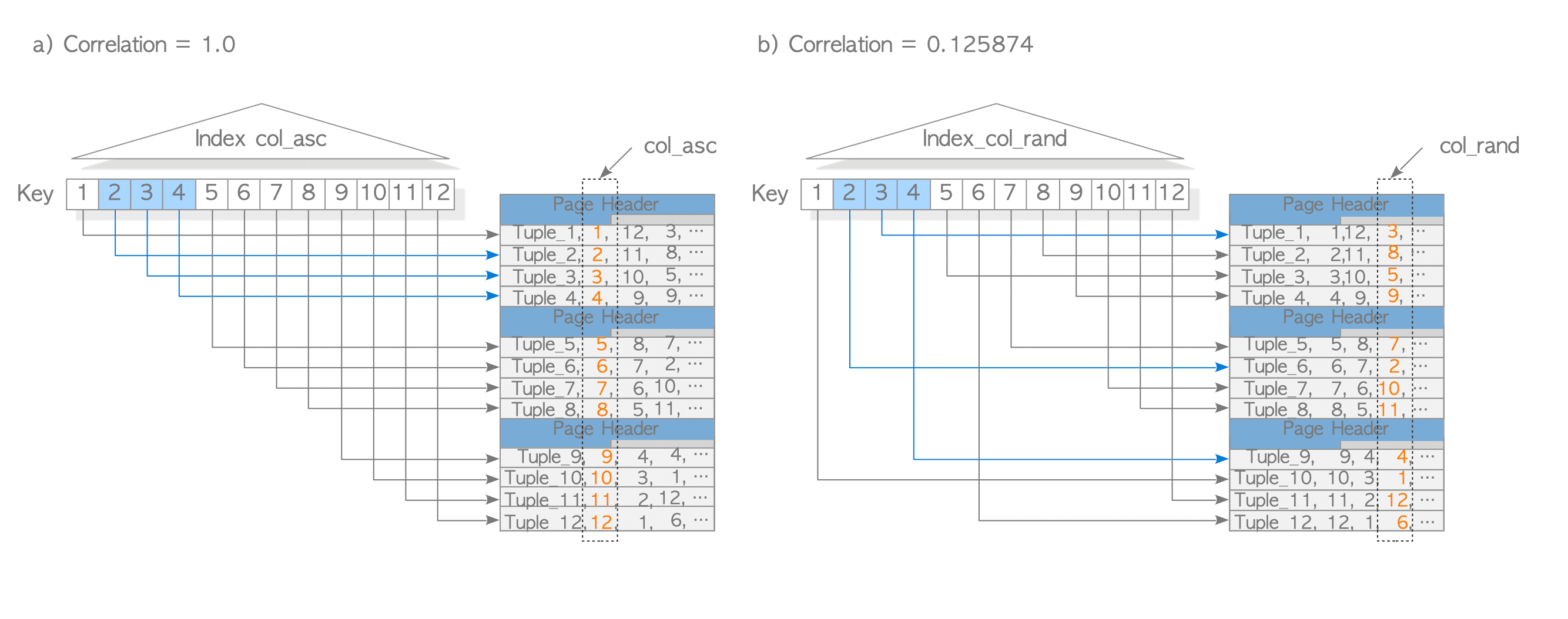
Figure 3.8. Two Examples of Index correlation.
Ultimately, index correlation is a statistical measure used during cost estimation to reflect the impact of random I/O access. It accounts for the discrepancy between the index order and the physical tuple order within the table.
3.2.2.3. Total Cost
Based on equations (3-5) and (3-14), the total cost is calculated as follows:
$$ \begin{align} \text{'total cost'} = 0.285 + 13.2 = 13.485 \tag{3-15} \end{align} $$The output of the EXPLAIN command confirms these estimations:
|
|
On line 4, the start-up and total costs are shown as $0.29$ and $13.49$, respectively (rounded from the calculated values). The planner also estimates that $240$ rows (tuples) will be scanned.
Line 5 displays the index condition Index Cond: $(\text{data} <= 240)$. Formally, this is an access predicate, which defines the start and stop conditions for the index scan.
The default values of seq_page_cost and random_page_cost are $1.0$ and $4.0$, respectively.
These defaults imply that PostgreSQL assumes random I/O is four times slower than sequential I/O, a ratio typical for traditional Hard Disk Drives (HDDs).
However, in modern environments where Solid State Drives (SSDs) are standard, the default random_page_cost is often excessively high. If this value remains at the default while running on an SSD, the planner may favor sequential scans over index scans even when the index would be more efficient. Therefore, for SSD-based storage, it is generally recommended to reduce random_page_cost to $1.0$.
The impact of inappropriate random_page_cost settings on query performance is documented in this blog.
3.2.3. Sort
The sort path is utilized for operations such as ORDER BY, the preprocessing of merge joins, and other internal functions. Sorting costs are estimated by the cost_sort() function.
In a sorting operation, the choice of algorithm depends on the data volume. If all tuples to be sorted fit within the memory allocated by work_mem, the quicksort algorithm is used. Otherwise, a temporary file is created and an external merge sort algorithm is employed.
The start-up cost of the sort path represents the cost of the sorting process itself. This is expressed as $O(N_{\text{sort}} \times \log_2(N_{\text{sort}}))$, where $N_{\text{sort}}$ is the number of the tuples to be sorted.
The run cost represents the cost of reading the already sorted tuples, which is $O(N_{\text{sort}})$.
This subsection explores the cost estimation for the following query, assuming the operation fits within work_mem without requiring temporary files:
testdb=# SELECT id, data FROM tbl WHERE data <= 240 ORDER BY id;In this scenario, the start-up cost is defined by the following equation:
$$ \begin{align*} \text{'start-up cost'} = C + \text{comparison_cost} \times N_{\text{sort}} \times \log_2(N_{\text{sort}}) \end{align*} $$Where:
- $C$ is the total cost of the preceding operation (in this case, the index scan). According to equation (3-15), it is $13.485$.
- $N_{\text{sort}}$ is the number of tuples to be sorted, which is $240$.
- $\text{comparison_cost}$ is defined as $2 \times \text{cpu_operator_cost}$.
Using the default $\text{cpu_operator_cost}$ of $0.0025$, the start-up cost is calculated as follows:
$$ \begin{align*} \text{'start-up cost'} = 13.485 + (2 \times 0.0025) \times 240.0 \times \log_2(240.0) = 22.973 \end{align*} $$The $\text{run cost}$ is the cost of reading the sorted tuples from memory:
$$ \begin{align*} \text{'run cost'} = \text{cpu_operator_cost} \times N_{\text{sort}} = 0.0025 \times 240 = 0.6 \end{align*} $$Consequently, the $\text{total cost}$ is:
$$ \begin{align*} \text{'total cost'} = 22.973 + 0.6 = 23.573 \end{align*} $$The EXPLAIN command output confirms these estimations:
|
|
On line 4, the start-up cost and total cost are shown as $22.97$ and $23.57$, respectively.
3.2.4. Cardinality Estimation
Previous discussions assumed that Selectivity could be determined with absolute accuracy. In reality, however, selectivity estimation has been one of the most persistent and challenging problems in database systems since their inception.
3.2.4.1. Selectivity vs. Cardinality
While PostgreSQL internally utilizes Selectivity, the broader database field generally focuses on Cardinality. Cardinality is represented as an integer, and the relationship between Selectivity and Cardinality is defined as:
$$ \text{Selectivity} = \frac{\text{Cardinality}}{N_{\text{tuple}}} $$Where $N_{\text{tuple}}$ is the total number of tuples (rows) in the table. Going forward, the term Cardinality will be used primarily.
3.2.4.2. Demonstrating the Difficulty of Cardinality Estimation
A concrete example illustrates the difficulty of Cardinality Estimation.
Consider a database representing 100 villagers.
The residents table records an age category (under18, young, middle, elder) and a driver’s license status (none, standard, gold).
(Here, “gold license” is a term used in Japan for a license issued to drivers who have been accident- and violation-free for five years.)
Database Setup
The table structure is defined as follows:
testdb=# CREATE TYPE license AS ENUM ('none', 'standard', 'gold');
CREATE TYPE
testdb=# CREATE TYPE age AS ENUM ('under18', 'young', 'middle', 'elder');
CREATE TYPE

testdb=# CREATE TABLE residents (id int, name text, license license, age age);
CREATE TABLE

testdb=# \d residents
Table "public.residents"
 Column  |  Type   | Collation | Nullable | Default
---------+---------+-----------+----------+---------
 id      | integer |           |          |
 name    | text    |           |          |
 license | license |           |          |
 age     | age     |           |          |
The residents.csv is here:
testdb=# COPY residents FROM '/usr/local/pgsql/residents.csv' (FORMAT csv);
COPY 100
testdb=# ANALYZE;
ANALYZE
Frequency Distribution
The Most Common Values (MCVs) and their frequencies for the age and license columns are retrieved from pg_stats:
-
Age Category Distribution:
testdb=# SELECT most_common_vals, most_common_freqs FROM pg_stats WHERE tablename = 'residents' AND attname='age';
       most_common_vals       |  most_common_freqs
------------------------------+---------------------
 {middle,young,under18,elder} | {0.35,0.25,0.2,0.2}
(1 row)
Table 3.1: Age Category Distribution. Age Category Frequency Corresponding Residents (100 total) under18 0.2 20 people young 0.25 25 people middle 0.35 35 people elder 0.2 20 people -
License Status Distribution:
testdb=# SELECT most_common_vals, most_common_freqs FROM pg_stats WHERE tablename = 'residents' AND attname='license';
   most_common_vals   | most_common_freqs
----------------------+-------------------
 {standard,none,gold} | {0.55,0.4,0.05}
(1 row)
Table 3.2: License Status Distribution. License Status Frequency Corresponding Residents (100 total) none 0.4 40 people standard 0.55 55 people gold 0.05 5 people
Initial Estimation Failure (Without Correlation Awareness)
A SELECT statement is executed to retrieve residents who are under18 and have no license (none). EXPLAIN ANALYZE compares the planner’s estimated value with the actual execution result:
testdb=# EXPLAIN (ANALYZE TRUE, TIMING FALSE, BUFFERS FALSE)
testdb-# 	 	  SELECT * FROM residents WHERE age = 'under18' AND license = 'none';
                                      QUERY PLAN
--------------------------------------------------------------------------------------
 Seq Scan on residents  (cost=0.00..2.50 rows=8 width=18) (actual rows=20.00 loops=1)
   Filter: ((age = 'under18'::age) AND (license = 'none'::license))
   Rows Removed by Filter: 80
 Planning Time: 0.183 ms
 Execution Time: 0.048 ms
(8 rows)
The estimated cardinality is $8$, while the actual row count is $20$.
This actual value reflects the real-world constraint that individuals under 18 cannot obtain a driver’s license (e.g., under this village’s law or Japanese law). Consequently, the entire under-18 group necessarily belongs to the “none” license category, resulting in exactly $20$ matching rows.
The Root Cause: Assuming Independence
The PostgreSQL planner calculates the estimate of $8$ by multiplying the proportion of under18 ($0.2$) by that of none ($0.4$), assuming the columns are independent: $(0.2 \times 0.4) \times 100 = 0.08 \times 100 = 8$.
Most RDBMS planners calculate Cardinality by assuming that columns are mutually independent unless specified otherwise. This ignores potential correlations between data. Consequently, as the correlation between columns strengthens, the accuracy of the planner’s estimation degrades. Cardinality Estimation remains an active area of research.
3.2.4.3. A Partial Solution: Extended Statistics
To address this, PostgreSQL introduced support for extended statistics in version 13. By using the CREATE STATISTICS statement, the correlation between the age and license columns can be captured in a new statistics object.
testdb=# CREATE STATISTICS stat_residents (mcv) ON license, age FROM residents;
CREATE STATISTICS
testdb=# ANALYZE;
ANALYZE
After analyzing the extended statistics, the estimation results for the under18 age group align more closely with reality:
-
age = ‘under18’ AND license = ’none’
testdb=# EXPLAIN (ANALYZE TRUE, TIMING FALSE, BUFFERS FALSE) testdb-# SELECT * FROM residents WHERE age = 'under18' AND license = 'none'; QUERY PLAN ------------------------------------------------------------------------------------- Seq Scan on residents (cost=0.00..2.50 rows=20 width=18) (actual rows=20.00 loops=1) Filter: ((age = 'under18'::age) AND (license = 'none'::license)) Rows Removed by Filter: 80 Planning Time: 0.515 ms Execution Time: 0.049 ms (8 rows) -
age = ‘under18’ AND license = ‘standard’
testdb=# EXPLAIN (ANALYZE TRUE, TIMING FALSE, BUFFERS FALSE) testdb-# SELECT * FROM residents WHERE age = 'under18' AND license = 'standard'; QUERY PLAN ------------------------------------------------------------------------------------- Seq Scan on residents (cost=0.00..2.50 rows=1 width=18) (actual rows=0.00 loops=1) Filter: ((age = 'under18'::age) AND (license = 'standard'::license)) Rows Removed by Filter: 100 Planning Time: 0.538 ms Execution Time: 0.073 ms (6 rows) -
age = ‘under18’ AND license = ‘gold’
testdb=# EXPLAIN (ANALYZE TRUE, TIMING FALSE, BUFFERS FALSE)
testdb-# 	 	  SELECT * FROM residents WHERE age = 'under18' AND license = 'gold';
                                     QUERY PLAN
-------------------------------------------------------------------------------------
 Seq Scan on residents  (cost=0.00..2.50 rows=1 width=18) (actual rows=0.00 loops=1)
   Filter: ((age = 'under18'::age) AND (license = 'gold'::license))
   Rows Removed by Filter: 100
 Planning Time: 0.112 ms
 Execution Time: 0.053 ms
(6 rows)
“None” license holders within the under18 group are estimated at $20$, which is an accurate number.
The estimated value of $1$ for “standard” and “gold” license holders within the under18 group is likely a result of rounding or smoothing logic, but it represents a significant improvement over the independent assumption.
PostgreSQL Extended Statistics can only be configured for columns within a single table. This feature cannot be applied to joins involving multiple tables.
Consequently, Cardinality Estimation for JOIN operations remains a significant challenge. While extensive research continues, a practical, universally applicable solution for cross-table cardinality estimation has yet to be realized.